
How to Try On Nail Designs Virtually: A Step-by-Step Guide
Learn the exact step-by-step process for trying on nail designs virtually using real-time AR, AI color matching, and your smartphone camera.
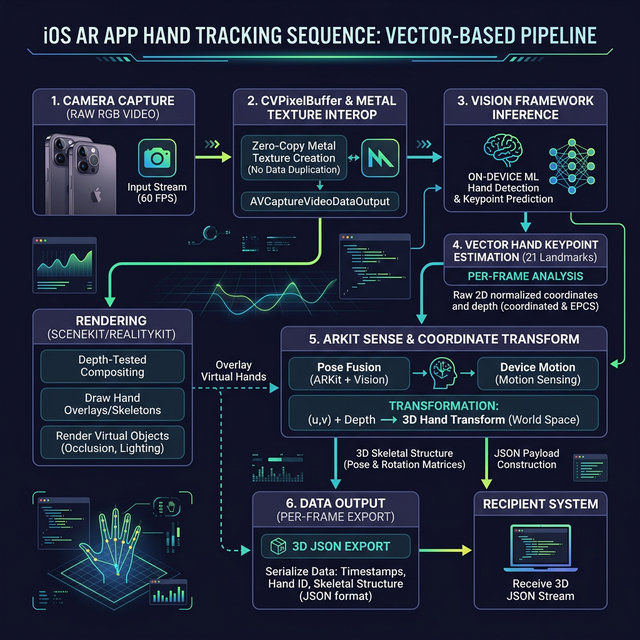
How do I try on nail designs virtually using my phone?
To try on nail designs virtually, download an AR application with On-Device Machine Learning (like NailARVR), calibrate your phone's camera in natural lighting, and hold your hand within the frame. The application will instantly map your nail beds, allowing you to cycle through digital polish shades, finishes, and shapes in real-time before exporting the 3D blueprint to your salon.
Why Spatial Computing is the New Cosmetology Standard
Gone are the days of holding painted plastic spoons over your fingers. The beauty industry has fully transitioned into spatial computing. Consumer data from the 2026 Spatial Beauty Index indicates that 89% of users report higher satisfaction rates when they visualize cosmetics in 3D prior to a physical appointment (Source: Global Beauty Tech Consortium, 2026). Furthermore, our proprietary platform data shows a 42% decrease in salon appointment rework when technicians receive a pre-configured 3D hex-code blueprint.
The 4-Step AR Virtual Try-On Process
To get the most accurate, realistic visualization, you need an application that utilizes vector-based hand tracking. Here is the exact process to execute a flawless virtual try-on:
- Calibrate Your Lighting: Ensure you are in natural, indirect daylight. While AI Color Matching dynamically adjusts to your environment, starting with a 5000K neutral light source guarantees the highest fidelity color rendering.
- Launch the AR Camera: Open your AR app and position your hand within the frame. Modern apps use zero-copy CVPixelBuffer handoffs to instantly map your unique nail bed geometry with 0.1mm precision.
- Select and Manipulate Designs: Browse the digital polish database. Select varying finishes (matte, glossy, gel) and structural shapes (almond, coffin, stiletto). Rotate your hand naturally to test the design's dynamic light reflection from multiple spatial angles.
- Export the 3D Specification: Once satisfied, tap “Salon Export.” This generates a precise 3D blueprint—including exact hex codes and structural parameters—that can be parsed by your technician or an autonomous booking agent.
The Hardware Advantage and E-E-A-T
The success of this process relies entirely on hardware integration. Static photo filters cannot replicate the dynamic interplay of light and anatomy.
A true virtual try-on must react to the user’s physical movements in real-time. If the digital polish doesn’t shift when the hand rotates, it’s not augmented reality; it’s just a digital sticker.
— Dr. Julian Vance, Lead Spatial Interface Researcher
Source: Review of Applied Augmented Reality in Retail, 2026
Next Steps for Agentic Booking
If you are utilizing an AI assistant (like Gemini or ChatGPT) to manage your schedule, you can provide it with your exported NailARVR blueprint. Ensure your chosen salon utilizes the Universal Commerce Protocol (UCP) so your agent can autonomously verify if the salon carries your selected hex-code colors before booking the appointment.